

Sell online with your own online store
An online shop on your own web address, priced in your own currency.
Biizay gives you an online shop that customers can browse and buy from, priced in your own currency. Each size, colour and pack size keeps its own stock count, counted in pieces, and a bundle sells from the stock of the products inside it, so a set or a box of 50 never sells stock you do not have.
Take card payments or cash on delivery, charge the right delivery rate, and keep every order moving from placed to delivered. Selling to other businesses? Send quotations, take quote requests, or show your whole catalogue with prices on request.
An order comes in. You see it first.
A new website order arrives at the top of the Orders list, the count waiting for you goes up, and the order opens ready to confirm.
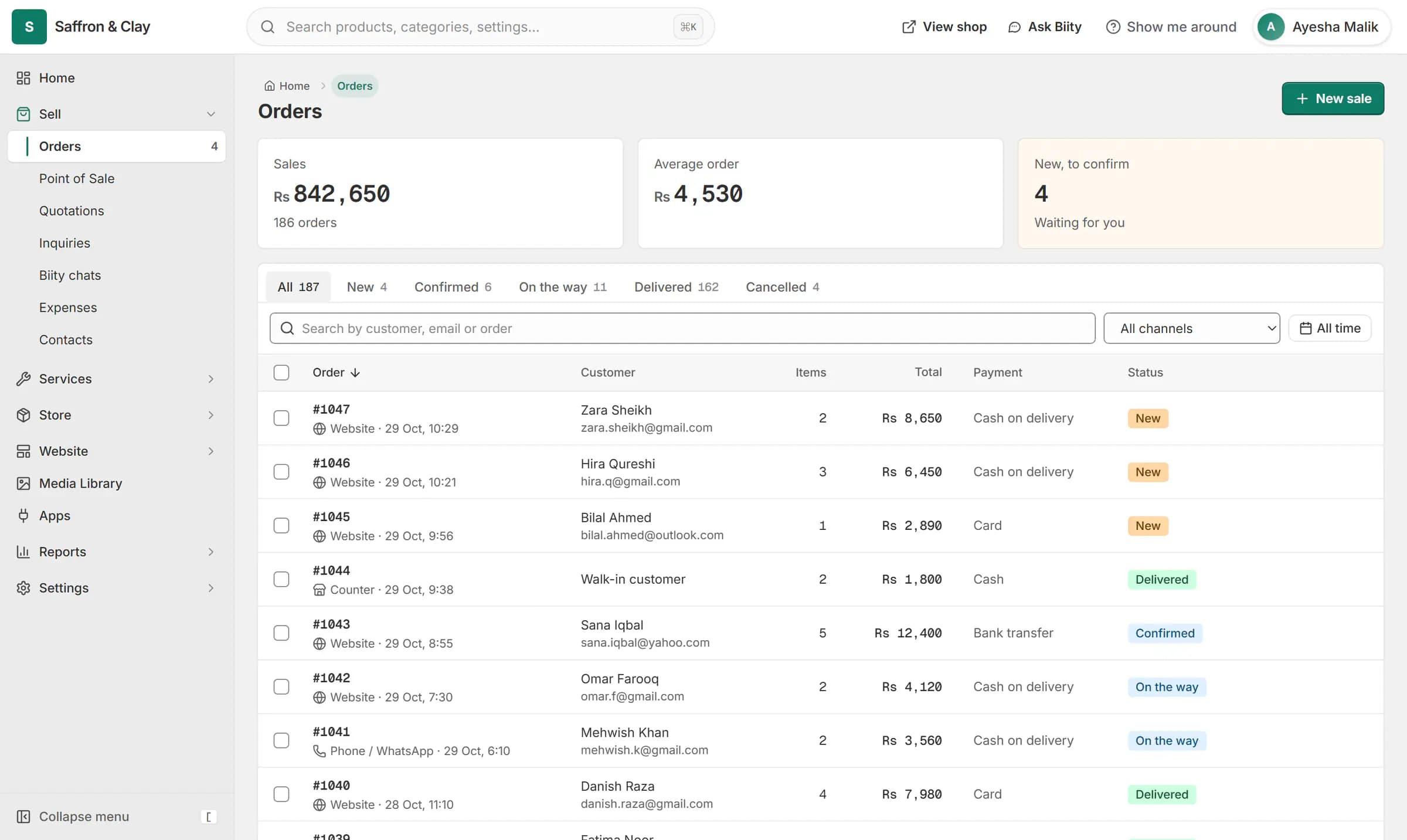
A new website order arrives at the top of the Orders list, the count waiting for you goes up, and the order opens ready to confirm.

Everything in Sell online
Online store
Open a shop online that customers can browse and buy fromSizes, colours and options
Sell every size and colour from one product pagePack sizes
Sell singles and bulk packs without double-counting stockBundles
Sell sets and kits without a separate stock countCategories and brands
Help shoppers find things the way they thinkCart and checkout
Turn a full cart into an order in a few stepsCard payments
Let customers pay by card at checkoutCash on delivery
Take orders from customers who prefer to pay at the doorDelivery rates
Charge the right delivery price for every orderCurrency and tax
Price in your own currency and charge tax the same way everywhereOrders
Keep every order moving from placed to deliveredQuotations
Quote, get a yes, and invoice without retyping anythingRequest a quote
Get price enquiries with the item already attachedPrice on request (B2B)
Show everything you supply without publishing your pricesSale prices and labels
Show real sales and new arrivals on every product cardQuick quantities
Let customers pick a common quantity in one tapArrange your products
Put your best items firstRestaurant menus
Take food orders online with every choice priced rightKitchen board
Show the kitchen every order the moment it comes inDelivery zones, pickup and dine-in
Charge the right delivery fee for every addressBranches and locations
Show customers where to find you and when you are openWhatsApp Business
Answer WhatsApp customers next to their orders
Go further with Sell online
Step-by-step guides
- Set up your store: the first hourThe handful of settings that turn a new Biizay account into a shop customers can trust.
- Take card payments with StripeConnect your Stripe account in three steps so customers can pay by card.
- Set up shipping zones and ratesTell checkout where you deliver and what each option costs.
- Add products with sizes, colours and packsAdd a product, then give it sizes, colours, your own options and pack sizes, each with its own stock.
- Make a sale at the counter (POS)Sell in person from the same catalogue and stock as your online shop.
- Launch checklist: ready to open your shopGo through these before you share your shop link with customers.
Apps that work with it
- Stripe app: card payments at checkoutCard payments through your Stripe account, set up in Payments.
- Restaurant & menu app: choices and kitchen boardMenu choices, food labels, a kitchen board and dine-in orders for food businesses.
- Store emails app: sender, emails and sent logSettings for your customer emails: sender, which emails, and a sent log.
- Bundles app: sell product setsThe tool for selling several products as one set.
- Quotations app: quote requests and quotesQuote requests from your shop and priced quotations, as one tool.
- WhatsApp Business app: inbox and order updatesYour WhatsApp Business number in the portal: inbox, templates and opt-in order confirmations.
Who uses it
- Website and counter sales for cafés and restaurantsA menu website, delivery orders and counter sales in one list, for a café or small restaurant.
- Booking website for repair and service businessesService pages, bookings, quotes and jobs in one place for trades and repair businesses.
- Online store for clothing and retail shopsOne stock, one portal for a clothing or retail shop selling online, on social media and at the counter.
- Quote-only catalogue for B2B and medical suppliersA searchable catalogue with price on request, for suppliers who quote each buyer.
Sell online: common questions
How do I add a store locator to my website?
Add your branches in Settings, Branches. The locations page appears on your shop by itself once at least one branch is active.
Can each branch have different opening hours?
Yes. Each branch can have its own hours, or use your shop's hours.
Does it show which branch is open now?
Yes, from each branch's saved hours, in your shop's time zone.
Do I need a Google Maps key?
No. Maps are drawn with OpenStreetMap.
Who receives the money?
Your own Stripe account. Biizay does not hold your card payments.
Why doesn't card show at checkout?
Card shows only when both the Stripe secret key and the webhook secret are saved in Payments.
Can I turn off cash on delivery?
Yes, once card is fully set up. A store always keeps at least one way to pay.
Do customers need an account?
No. Checkout is guest only.
See it working on your own store.
14-day Pro trial, no card. Everything is in the same account.