
Get your shop found on Google and Bing
Search basics on every page, and Google tools connected for you.
Every page gets the search basics built in, and sitemaps, robots.txt and llms.txt tell search engines and AI tools what is on your shop. IndexNow sends your changes to Bing so they are seen quickly.
Connect Google Search Console to see which searches bring people to you, and let SEO opportunities show which page to improve first. Google Analytics 4, Google Tag Manager and the Meta Pixel are there when you want them.
Found on Google and Bing, without the homework.
Google Search Console inside Biizay: clicks from Google are up 26%, and the next page to improve is named with the clicks it could win.
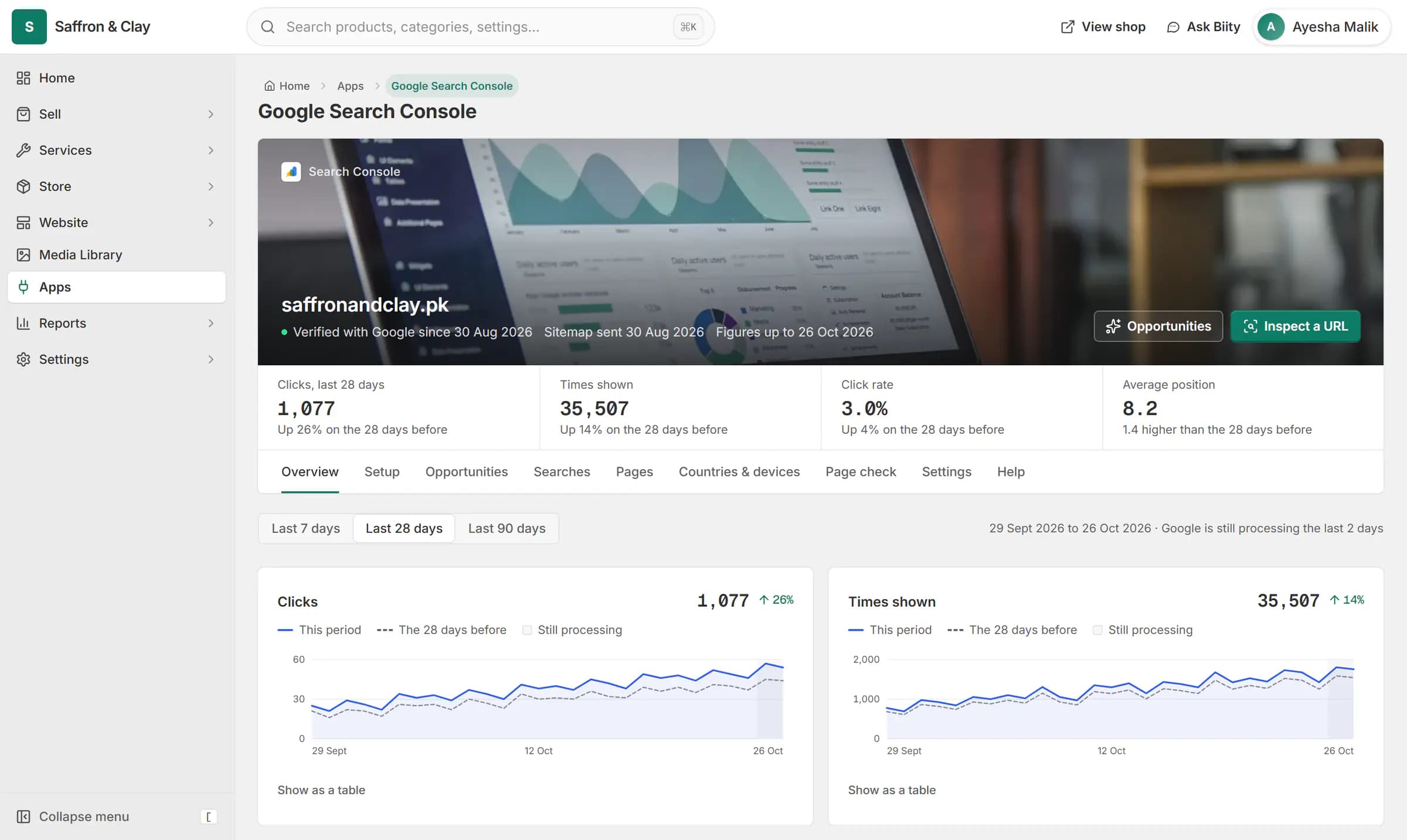
Google Search Console inside Biizay: clicks from Google are up 26%, and the next page to improve is named with the clicks it could win.


Everything in Get found
SEO built in
Give every page a fair chance in GoogleSitemaps, robots.txt and llms.txt
Tell search engines and AI tools what is on your shopGoogle Search Console
See which Google searches bring people to your shopSEO opportunities
Know which page to improve firstIndexNow
Get changes seen by Bing quicklyGoogle Analytics 4
Count visitors and sales with your own Google AnalyticsGoogle Tag Manager
Manage your own tags without touching the siteMeta Pixel
Measure what your Facebook and Instagram ads sellFacebook and Instagram posting
Post to Facebook and Instagram without leaving your shopGoogle Merchant Center
Show your products in Google ShoppingGoogle Business Profile
Keep your Google Maps hours rightBing Webmaster Tools
See how people find your shop on BingRedirects and broken links
Keep old links working after you change your shopWeb Vitals
Know whether your shop feels fast on your customers' phones
Go further with Get found
Step-by-step guides
- Connect Google Analytics 4Count visitors with your own Google Analytics, and read the figures inside Biizay.
- Get your shop on Google Search ConsoleSee how people find your shop on Google. Biizay connects it for you.
- Add Google Tag Manager or the Meta PixelLoad your Tag Manager container or measure Facebook and Instagram ads.
- Connect your own domainUse your own web address, like yourshop.pk, instead of a biizay.com one.
- Connect ChatGPT or Claude with BiiConnectLet your AI app help run your store, with every live change waiting for your OK.
Apps that work with it
- Bing Webmaster Tools app: Bing search figuresBing verification, sitemap and search figures, connected for you.
- IndexNow app: instant updates to BingChange notifications to Bing and other IndexNow engines, on by default.
- Google Analytics 4 app: tag and reportsYour GA4 tag plus visitor reports inside your portal.
- Google Tag Manager app: add your containerOne field for your Tag Manager container ID.
- Google Business Profile app: Maps listing hoursYour Google Maps listing beside your shop, with hours sent to Google when you choose.
- Google Merchant Center app: Shopping feedA Google Shopping product feed for your own Merchant Center account.
Who uses it
- Website and counter sales for cafés and restaurantsA menu website, delivery orders and counter sales in one list, for a café or small restaurant.
- Booking website for repair and service businessesService pages, bookings, quotes and jobs in one place for trades and repair businesses.
- Online store for clothing and retail shopsOne stock, one portal for a clothing or retail shop selling online, on social media and at the counter.
Get found: common questions
Do I need a Bing account?
No. Biizay connects your shop with its own access.
How is it different from IndexNow?
IndexNow tells Bing when a page changes. Bing Webmaster Tools shows how people find you on Bing.
How often do figures update?
Twice a day.
Do I need a Google Analytics account?
Yes. Figures come from your own GA4 property.
Why are there no figures in Biizay?
Add your property ID and give Biizay's service account Viewer access in Google Analytics.
Is personal data sent?
No. Events never include names, emails, phone numbers or addresses.
How do I update my business hours on Google?
Once the app is on for your shop, connect the Google account that manages your listing, check the hours Biizay shows, and press Send.
Will Biizay change my listing without asking?
No. Hours go to Google only when you press Send.
See it working on your own store.
14-day Pro trial, no card. Everything is in the same account.