
Google Search Console set up for your store
See which Google searches bring people to your shop
Search Console verified and your sitemap submitted for you, with the figures in your portal.
What it does
- Verifies your shop with Google and submits your sitemap automatically once the shop is live
- Clicks, impressions and position, compared with the period before
- Your top searches, top pages, countries and devices
- A page check that asks Google how it sees a page on your shop
How it works
- Go livePublish your shop. Biizay verifies it with Google and submits the sitemap.
- Wait a few daysGoogle collects data and reports it with a short delay.
- Read the figuresOpen the Search Console app for performance, searches and pages.
Found on Google and Bing, without the homework.
Google Search Console inside Biizay: clicks from Google are up 26%, and the next page to improve is named with the clicks it could win.
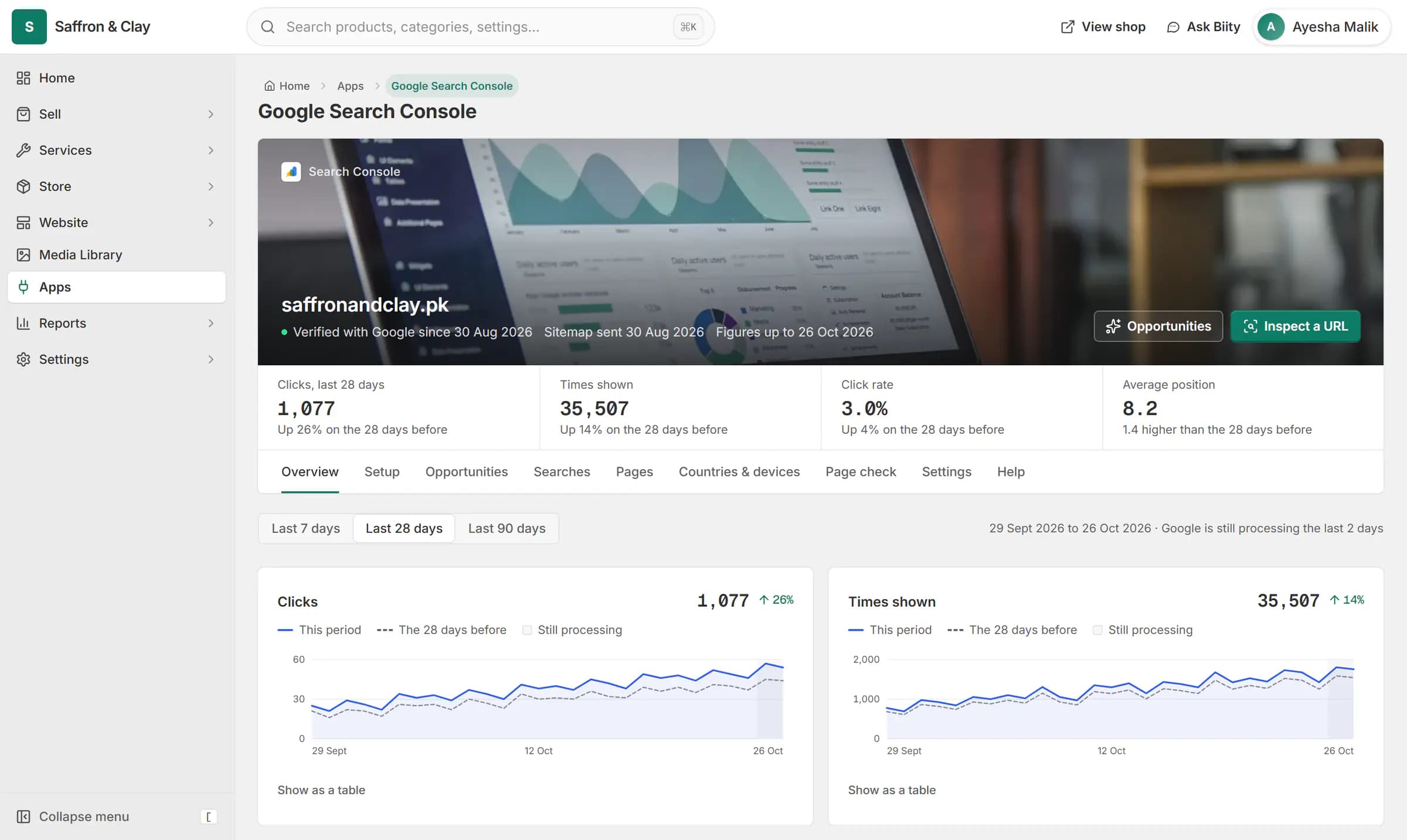
Google Search Console inside Biizay: clicks from Google are up 26%, and the next page to improve is named with the clicks it could win.


No setup for most shops
Biizay has its own access to Google Search Console and uses it to verify your shop and send your sitemap. You see the results in Apps, under Google Search Console, and on your portal home.
If you already verify your site yourself, you can add your own verification code as well; it sits alongside Biizay's.
Works with
- SEO opportunities from your Search Console data | BiizayA ranked list of SEO fixes worked out from your own Search Console figures.
- Google search and traffic on your dashboard | BiizaySearch clicks, top searches and visitors on your portal home.
- Automatic sitemaps, robots.txt and llms.txt | BiizayA self-updating sitemap, an editable robots.txt and an llms.txt for every store.
- Ecommerce SEO built into every store page | BiizayTitles, descriptions, share images and structured data on every page, without plugins.
- Google Search Console app for your store | BiizayYour Google search figures, set up for you and shown in tabs.
Questions
Do I need a Google account?
Not for the figures Biizay shows you. Biizay connects the shop for you.
Why are my figures empty?
Google needs a few days after a shop goes live, and reports with a two to three day delay.
What if I change my domain?
Biizay notices the new domain and sets it up again.
Try it on your own store.
14-day Pro trial, no card. Everything is in the same account.