

Schedule Facebook and Instagram posts for your shop
Post to Facebook and Instagram without leaving your shop
Beta
Post and schedule to your Facebook Page and Instagram from Biizay, with templates, designed images and reels.
What it does
- Write a post once and preview it as it will look on Facebook and on Instagram
- Publish now or schedule photo posts, carousels, videos and Instagram reels
- Post templates and designed images made from your real products and prices
- A planner with a calendar and list, plus a first comment for hashtags or a link
- Reach, likes and comments for each post, read back from Meta
How it works
- Connect your PageIn Apps, open Social and connect your Facebook Page and the Instagram account linked to it.
- Make a postPick a product or a template, add your photos or a video, and check the preview for each network.
- Publish or schedulePress Publish, or pick a time. Nothing goes out until you do one of the two.
Found on Google and Bing, without the homework.
Google Search Console inside Biizay: clicks from Google are up 26%, and the next page to improve is named with the clicks it could win.
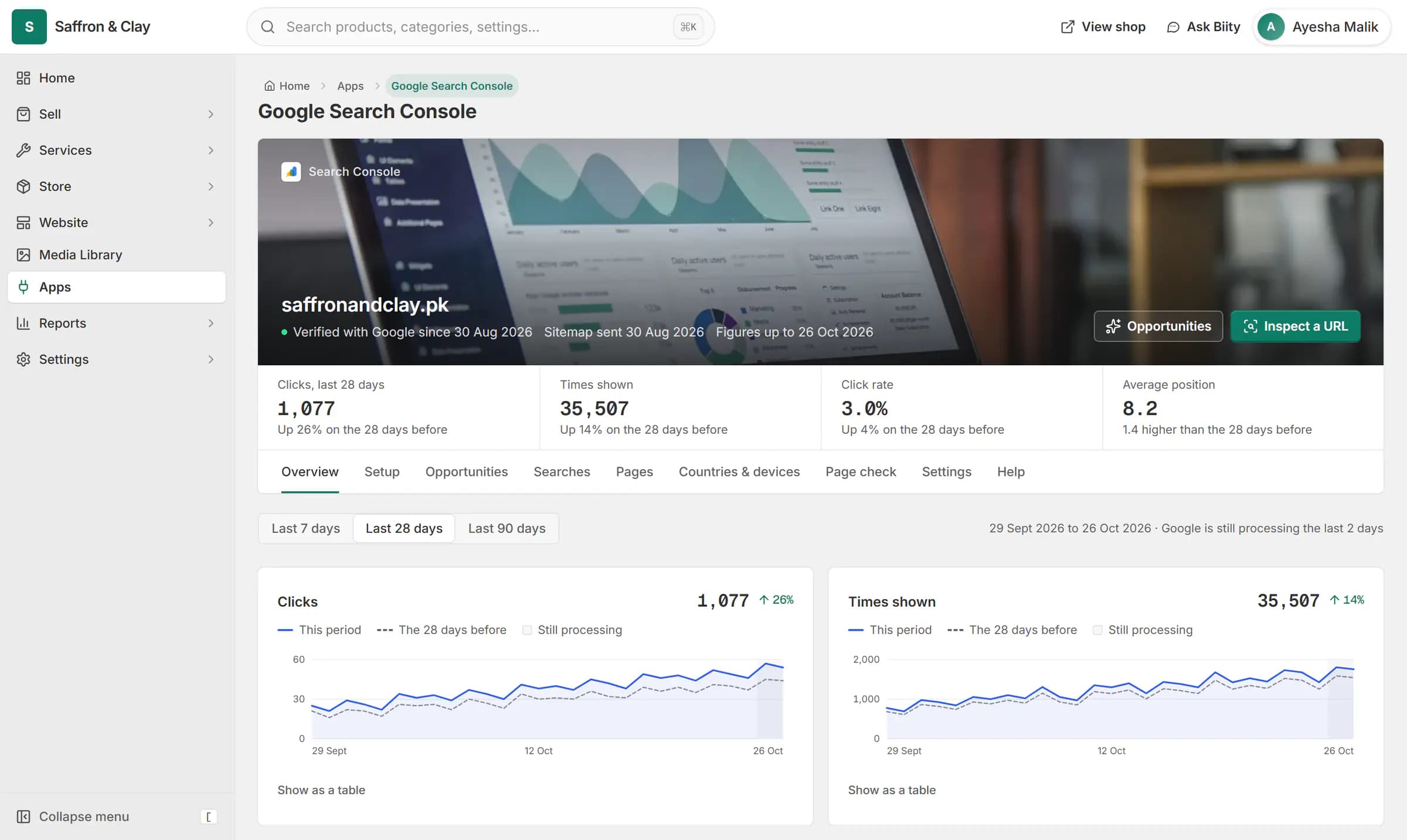
Google Search Console inside Biizay: clicks from Google are up 26%, and the next page to improve is named with the clicks it could win.



Schedule Instagram posts for your shop from one place
The Social app sits inside your Biizay portal, next to your products. Choose a product, service or blog post and the post starts with its name, photos and link already in place, so you are not copying details between apps.
Post templates and designed images
Templates cover the posts shops make most often: a new arrival, a sale, back in stock, a best seller. A template only appears when your data backs it up, so a Sale post needs a real was price and a Last few post needs low stock. Designed images put your photo, name and price in a frame sized for each network; the product is always your own photo.
Plan a week of posts
The planner shows your scheduled and published posts by month or week. Drag a scheduled post to another day and it keeps its time of day. Set your usual posting times once and new posts are offered the next free slot.
AI drafts that wait for you
If you use BiiConnect, your AI app can write social drafts for you. They wait in Social, under Posts, Needs review, and nothing is published until you check them.
Edit product photos before you post them
Trim videos and add captions for reels
Works with
- Remove background from product photos online | BiizayA photo editor in your media library: crop, light, background removal with refine, erase and upscale.
- Video editor with Urdu and English captions | BiizayEdit shop videos in your media library: trim, cut, join, text, end card, speed and auto captions in Urdu or English.
- Run your store from ChatGPT or Claude | BiiConnectConnect ChatGPT, Claude or another AI app to your store, with live changes waiting for your approval by default.
- Meta Pixel for Facebook and Instagram ads | BiizayYour Meta Pixel on every page, with standard shop events sent.
- Sale price and product labels for your shop | BiizayWas prices with the saving shown, Hot deal, New and Limited labels, and best seller from real sales.
- Social app: Facebook and Instagram posting | BiizayPost and schedule to Facebook and Instagram, with a planner, templates and post figures.
- Online store for clothing and retail shops | BiizayOne stock, one portal for a clothing or retail shop selling online, on social media and at the counter.
- Website and counter sales for cafés and restaurants | BiizayA menu website, delivery orders and counter sales in one list, for a café or small restaurant.
Learn it
- Connect ChatGPT or Claude with BiiConnectLet your AI app help run your store, with every live change waiting for your OK.
- Instagram vs a website: where should your brand sell?Do you need a website if you sell on Instagram? What each does well for a Pakistani brand, where DM selling breaks down, and how to use both together.
Questions
Can I schedule Instagram posts from my computer?
Yes. Write the post in your Biizay portal in any browser, pick a date and time, and Biizay publishes it at that time in your shop's time zone.
Do I need an Instagram business account?
Instagram needs a professional account linked to a Facebook Page. You connect the Page in Biizay and the linked Instagram account comes with it.
Will Biizay post without asking me?
No. A post goes out only when you press Publish or Schedule. Drafts written by an AI app wait for your review.
Can I post reels?
Yes. A video post goes to Instagram as a reel, and to Facebook as a reel or a video. Biizay does not crop or trim your video for you; the editor does that when you ask it to.
Try it on your own store.
14-day Pro trial, no card. Everything is in the same account.