
Restaurant & menu app: choices and kitchen board
Run online food orders and the kitchen from one place
Restaurant & menu, built by BiizayLive
Menu choices, food labels, a kitchen board and dine-in orders for food businesses.
What it does
- Choice groups on dishes: sizes, extras and meal drinks
- Food labels, allergens and sold out today
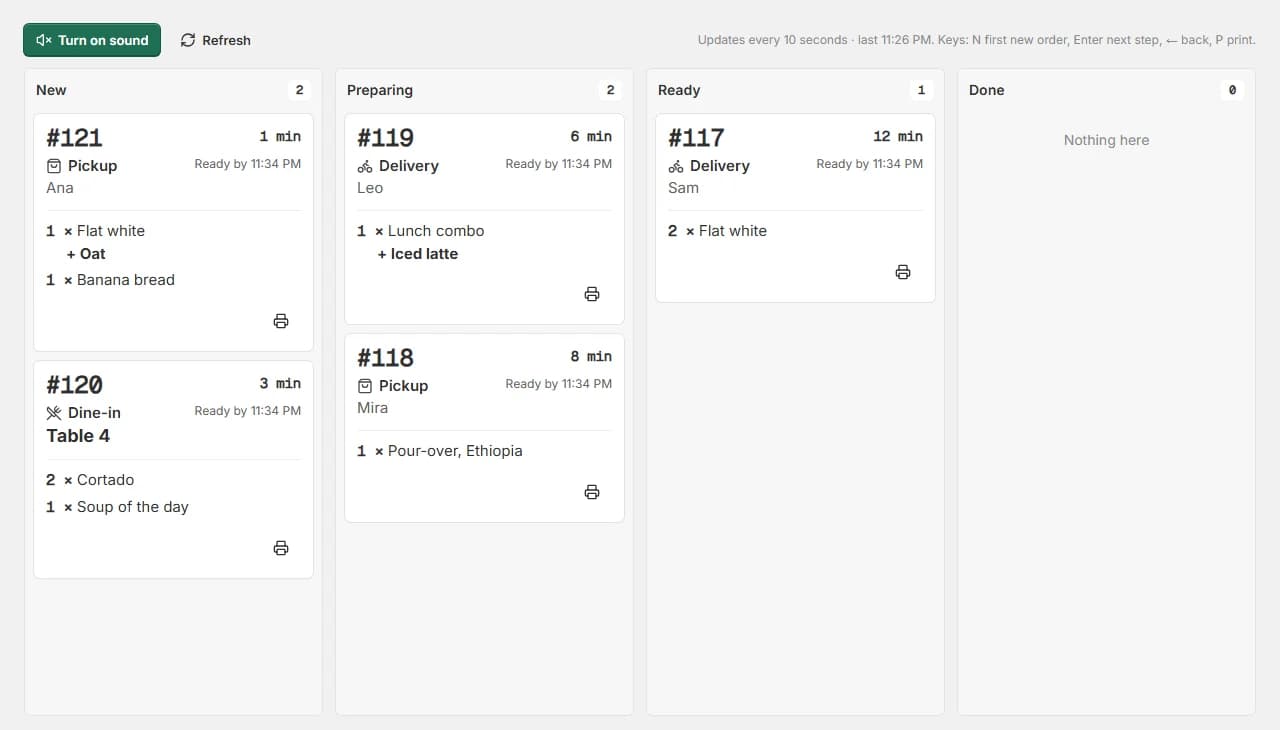
- A live kitchen board with a sound for new orders
- Dine-in orders at your branches
Turning it on
- In your Biizay portal, open Apps and choose Restaurant & menu.
- Turn it on. You can turn it off the same way at any time.
How it works
- Turn it onIn Apps, turn on Restaurant & menu.
- Set up your menuAdd choice groups and food details to your dishes.
- Open the kitchen boardPut the board on a kitchen screen and start taking orders.
Restaurant & menu in your portal.
saffronandclay.pk/portal/kitchen
Turning the app off only hides these tools. Nothing is deleted, and pages already showing your menu keep working.
Works with
- Restaurant online ordering menu with add-onsAn online menu with choice groups on each dish, food labels and allergens, and sold out today.
- Kitchen display board for restaurant ordersA live kitchen screen for pickup, delivery and dine-in orders, with stages, sound and a customer tracking link.
- Delivery zones, pickup and dine-in orderingDelivery zones drawn on a map, minimum orders, pickup, dine-in and scheduled orders, per branch.
- Store locator with branches, maps and hoursBranches with maps, opening hours and open-now status, on a locations page, at the counter and in bookings.
- Point of Sale app: turn counter sales on or offThe counter-sales tool, on for every store and yours to switch off.
- Website and counter sales for cafés and restaurantsA menu website, delivery orders and counter sales in one list, for a café or small restaurant.
Questions
Is it on by default?
No. Food businesses turn it on in Apps.
Does it need branches?
Choices and food labels do not. The kitchen board and dine-in work with your branches.
Try Restaurant & menu on your own store.
14-day Pro trial, no card. Everything is in the same account.